Mac GPU Checker
A macOS GPU benchmark in real TFLOPS (fp16 GEMM) — and whether the chip holds it under load.
 Dev-story
Challenge
Buying a used Mac, peak GPU numbers lie: a dusty machine hits peak for a second and then collapses. You want to know whether the chip holds its number, not just touches it.
What we did
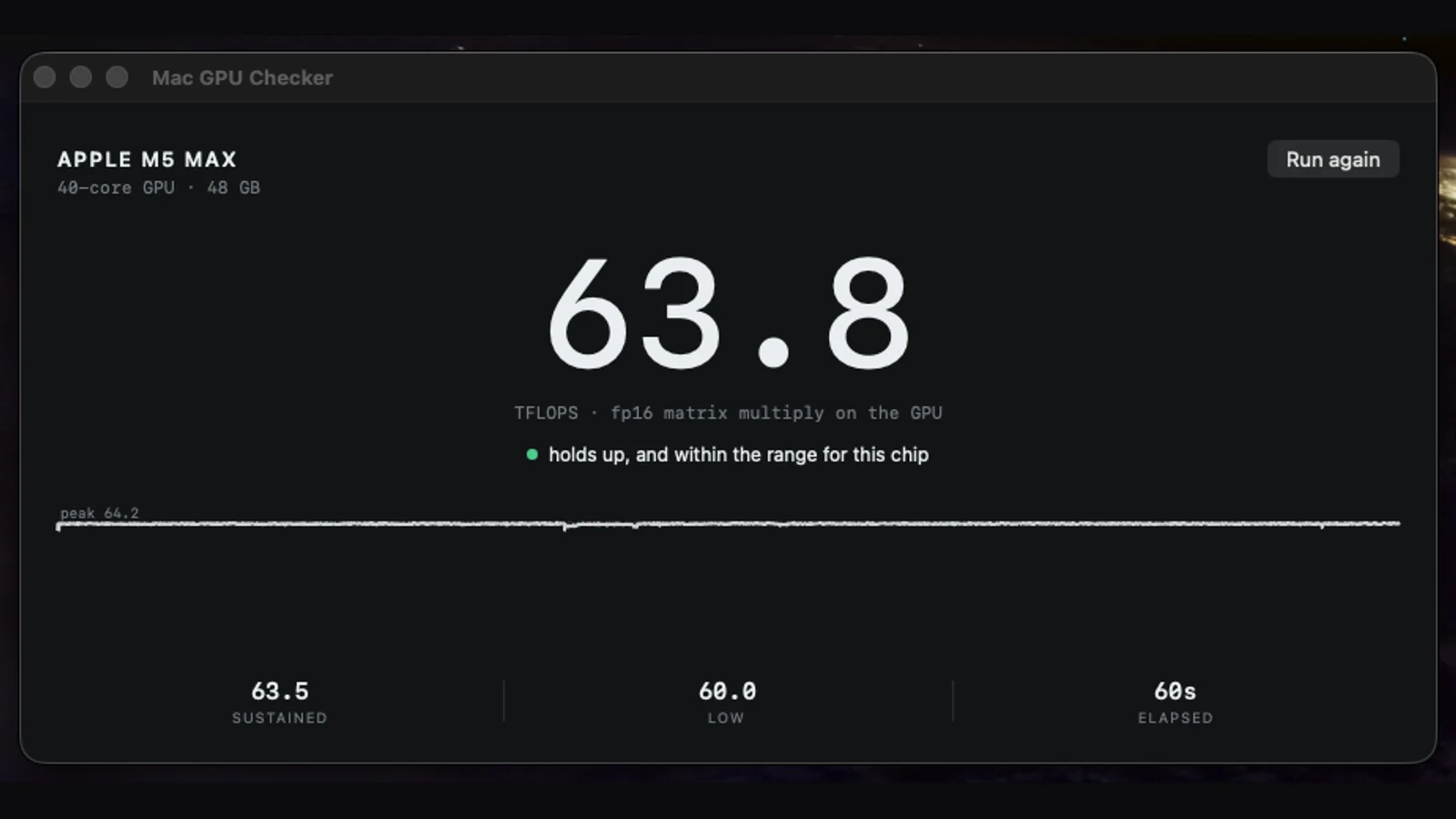
A Swift app that runs a 4096×4096 fp16 matrix multiply on the GPU through Metal Performance Shaders for 60 seconds; the big number is the current TFLOPS (FLOPs counted exactly as 2·M·N·K, so it is physical performance, not points), a live curve shows how the machine holds it, and a verdict compares against the expected range for that chip generation. A headless mode prints one JSON line for comparing machines.
Result
One window, one big number and the shape of a curve tell you in under a minute whether a Mac GPU holds up or throttles — a genuine cooling stress test that doubles as a used-Mac inspection tool.
Dev-story article
Mac GPU Checker: how the project was built
Peak GPU numbers are the easiest thing in the world to fake: almost any Mac, even one with a radiator packed with dust, will hit its rated TFLOPS for a second or two, then heat up and fall apart. Mac GPU Checker was built for exactly that moment — inspecting a used Mac — so the big number on screen is not the peak, it is what the machine is doing right now, with the shape of the curve next to it as the actual diagnosis.
Sections
05
Modules
05
Stack
Swift + Metal
Why the project exists
Buying a used Mac, peak GPU numbers lie: a dusty machine hits peak for a second and then collapses. You want to know whether the chip holds its number, not just touches it.
Peak GPU numbers are the easiest thing in the world to fake: almost any Mac, even one with a radiator packed with dust, will hit its rated TFLOPS for a second or two, then heat up and fall apart. Mac GPU Checker was built for exactly that moment — inspecting a used Mac — so the big number on screen is not the peak, it is what the machine is doing right now, with the shape of the curve next to it as the actual diagnosis.
What was built
A Swift app that runs a 4096×4096 fp16 matrix multiply on the GPU through Metal Performance Shaders for 60 seconds; the big number is the current TFLOPS (FLOPs counted exactly as 2·M·N·K, so it is physical performance, not points), a live curve shows how the machine holds it, and a verdict compares against the expected range for that chip generation. A headless mode prints one JSON line for comparing machines.
A single-window Swift app that runs a 4096x4096 fp16 matrix multiply on the GPU through Metal Performance Shaders for 60 seconds. The huge number is the current TFLOPS; a line underneath shows a verdict (holds up, throttling, or below the range for this chip); and a live chart draws the peak as a dashed line with the sustained curve beneath it. A headless mode prints a single line of JSON, so a used-Mac buyer can compare several machines from a USB stick.
Main modules and user path
The number is physics, not points: FLOPs for a GEMM are counted exactly as 2*M*N*K, so the TFLOPS figure is real throughput rather than an invented benchmark score.
It measures the thing that actually matters on a used machine — hold, not peak: sustained is the average of the recent samples and low is the worst sample of the run, so a chip that throttles after 20-40 seconds shows a clear step down instead of a friendly peak.
It knows what good looks like: the app carries the expected range for the chip generations it recognizes and says outright when a machine is below it.
It doubles as a cooling stress test: a GEMM heats the GPU harder than almost any real workload, so a flat line means the thermal system copes, while a downward step or a sawtooth means dust, dried paste or contention.
It travels: the install script can build a portable copy onto a USB stick, and because the app is unsigned on an unfamiliar Mac it documents the one-time right-click-Open and the headless CLI path for a GUI-free check.
Architecture and technology decisions
Built with Swift, Metal, macOS.
Swift + Metal Performance Shaders for the GEMM kernel; a 60-second sampled run reporting peak, sustained and low; a per-chip expected-range table for the verdict; a headless mode emitting one JSON line; and a build/install script with a portable USB target.
Result and lessons
One window, one big number and the shape of a curve tell you in under a minute whether a Mac GPU holds up or throttles — a genuine cooling stress test that doubles as a used-Mac inspection tool.
One window, one honest number and the shape of a curve tell you in under a minute whether a Mac GPU holds its rated performance or quietly throttles — the difference between a good used-Mac deal and an expensive space heater.
Related articles
Read next
Related project stories
These projects share nearby technical or product decisions, so they show how the same principle behaves in another context.
 Dev-story
Voice
macOS menu-bar dictation with local Whisper — speech to text in any app, on-device.
 Dev-story
FableVita
FableVita — an AI fitness coach with leagues, quests and a fraud-safe rewards economy.
 Dev-story
CMS
A dynamic headless CMS on webedge-db — content types, media, roles, and the public read API behind our sites and their articles.
Have a similar idea?
Discuss your project